05. EVPN VPWS
5.1 CE向けインタフェースの設定
ゴール
PEルータにCE向けインタフェースの設定を行うこと
今回のEVPN-VPWSシナリオでは、Windows側は1台のPEルータ(C8102-1)のみに接続するシングルホーミング構成、Ubuntu側は2台のPEルータ(C8102-2とC8102-3)に接続するオールアクティブマルチホーミング構成を想定します。
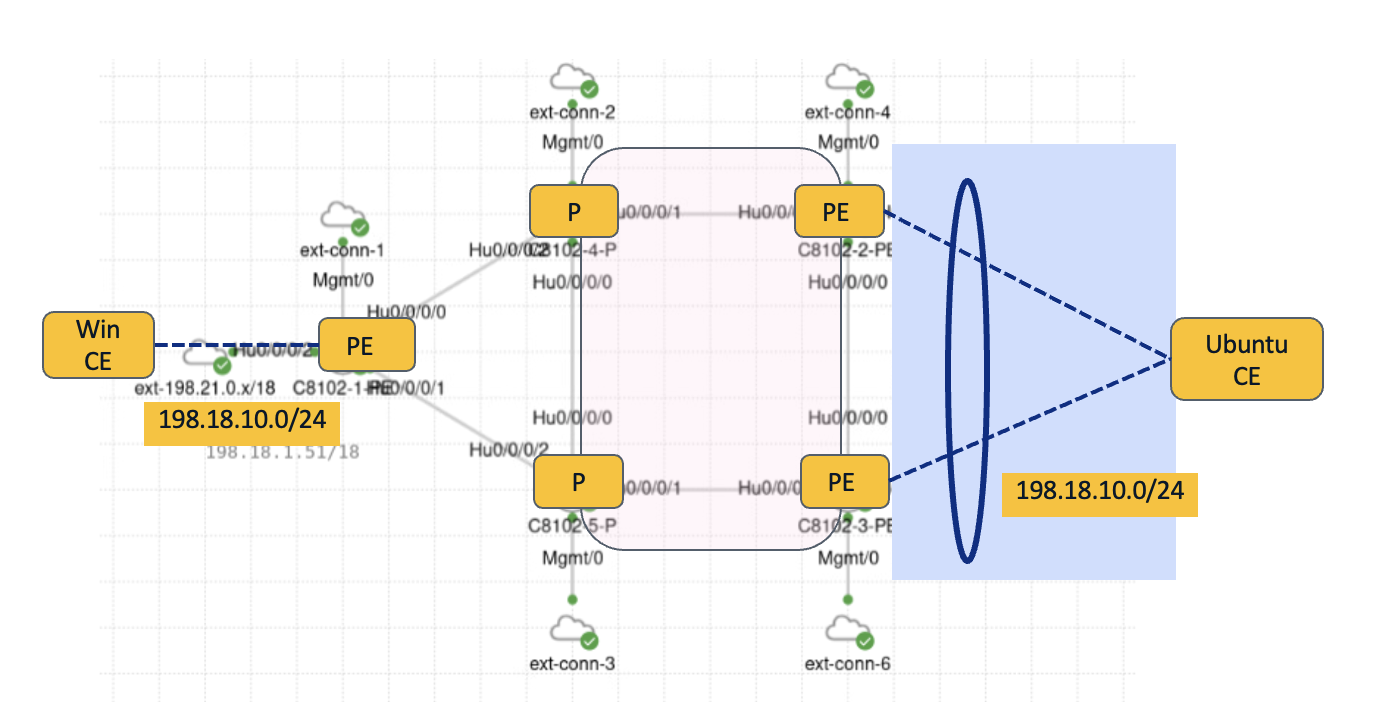
まず、シングルホーミング構成のPEルータ(C8102-1)のCE(Windows)向けインタフェースの設定を下記のように行います。
interface HundredGigE0/0/0/2
 l2transport
 !
!
次に、マルチホーミング構成のPEルータ(C8102-2とC8102-3)のCE(Ubuntu)向けインタフェース設定を行います。System Mac は同じ値を設定します。
interface Bundle-Ether1
 lacp system mac 1212.1212.1212
 l2transport
 !
!
interface HundredGigE0/0/0/2
 bundle id 1 mode on
!
Ubuntu側にもLACP設定を行います。デスクトップにある nso-server の TeraTerm アイコンをクリックすると、Ubuntu (198.18.134.27) にアクセスできます。
その後、/etc/netplanにディレクトリを移動して、01-netcfg.yaml を新規作成します。

<01-netcfg.yaml>
network:
  bonds:
    bond0:
      interfaces: [ens224, ens256]
      addresses: [198.18.10.200/24]
      parameters:
        mode: 802.3ad
“sudo netplan apply” で設定を適用します。下記のWarningは無視してください。

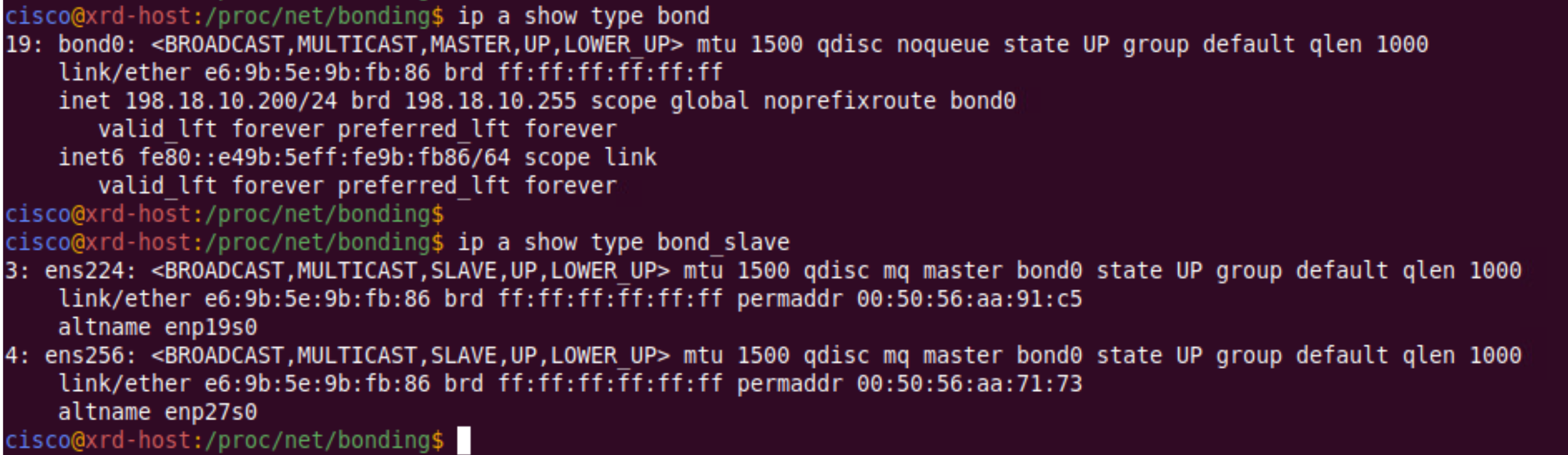
“ip a show type bond” 及び “ip a show type bond_slave” で設定が反映されていることを確認します。
5.2 PEルータでXCONNECT設定
ゴール
PEルータ(C8102-1〜C8102-3)にてXCONNECT設定を行うこと
Windows側のPE(C8102-1)には下記の設定を行います。
l2vpn
 xconnect group 100
  p2p vpws100
   interface HundredGigE0/0/0/2
   neighbor evpn evi 100 target 20 source 10
Ubuntu側のPE(C8102-2とC8102-3)には下記の設定を行います。
対向のPE(C8102-1)とtarget IDと source ID を逆にします。
l2vpn
 xconnect group 100
  p2p vpws100
   interface Bundle-Ether1
   neighbor evpn evi 100 target 10 source 20
現時点では、XCONNECTがUPしていないことを確認します。
RP/0/RP0/CPU0:c8102-1#show l2vpn xconnect
Mon Dec 15 05:28:08.636 UTC
Legend: ST = State, UP = Up, DN = Down, AD = Admin Down, UR = Unresolved,
        SB = Standby, SR = Standby Ready, (PP) = Partially Programmed,
        LU = Local Up, RU = Remote Up, CO = Connected, (SI) = Seamless Inactive

XConnect                   Segment 1                       Segment 2
Group      Name       ST   Description            ST       Description            ST
------------------------   -----------------------------   -----------------------------
100        vpws100    DN   Hu0/0/0/2              UP       EVPN 100,20,None       DN
----------------------------------------------------------------------------------------
RP/0/RP0/CPU0:c8102-1#
5.3 MP-BGP 設定
ゴール
リモートPE間でBGPセッションを確立し、XCONNECT がUPすること
PE ルータにてBGP を設定(C8102-1 ~ C8102-3)
- router-id は、設定対象ルータのループバックアドレスに変更してください。
- ネイバーアドレスは、他PEのループバックアドレスを設定してください。
router bgp 65000
 bgp router-id 1.1.1.1
 address-family l2vpn evpn
 !
 neighbor-group PEs
  remote-as 65000
  update-source Loopback0
  address-family l2vpn evpn
  !
 neighbor 2.2.2.2
  use neighbor-group PEs
 !
 neighbor 3.3.3.3
  use neighbor-group PEs
 !
PE間でBGPが上がっていることを確認します。(C8102-1 ~ C8102-3)
RP/0/RP0/CPU0:c8102-1#show bgp l2vpn evpn neighbors brief
Wed Dec 24 08:08:32.313 UTC

Neighbor         Spk    AS  Description                         Up/Down  NBRState
2.2.2.2           0 65000                                      00:00:32 Established
3.3.3.3           0 65000                                      00:00:11 Established
RP/0/RP0/CPU0:c8102-1#
XCONNECTステートを確認します。C8102-2, C8102-3はUPですが、C8102-1はDOWNのままであることがわかります。
RP/0/RP0/CPU0:c8102-1#show l2vpn xconnect
Wed Dec 24 08:11:03.246 UTC
Legend: ST = State, UP = Up, DN = Down, AD = Admin Down, UR = Unresolved,
        SB = Standby, SR = Standby Ready, (PP) = Partially Programmed,
        LU = Local Up, RU = Remote Up, CO = Connected, (SI) = Seamless Inactive

XConnect                   Segment 1                       Segment 2
Group      Name       ST   Description            ST       Description            ST
------------------------   -----------------------------   -----------------------------
100        vpws100    DN   Hu0/0/0/2              UP       EVPN 100,20,2.2.2.2    DN
----------------------------------------------------------------------------------------
RP/0/RP0/CPU0:c8102-1#RP/0/RP0/CPU0:c8102-2#show l2vpn xconnect
Wed Dec 24 08:11:12.451 UTC
Legend: ST = State, UP = Up, DN = Down, AD = Admin Down, UR = Unresolved,
SB = Standby, SR = Standby Ready, (PP) = Partially Programmed,
LU = Local Up, RU = Remote Up, CO = Connected, (SI) = Seamless Inactive
XConnect Segment 1 Segment 2
Group Name ST Description ST Description ST
------------------------ ----------------------------- -----------------------------
100 vpws100 UP BE1 UP EVPN 100,10,1.1.1.1 UP
----------------------------------------------------------------------------------------
RP/0/RP0/CPU0:c8102-2#RP/0/RP0/CPU0:c8102-3#show l2vpn xconnect
Wed Dec 24 08:11:17.169 UTC
Legend: ST = State, UP = Up, DN = Down, AD = Admin Down, UR = Unresolved,
SB = Standby, SR = Standby Ready, (PP) = Partially Programmed,
LU = Local Up, RU = Remote Up, CO = Connected, (SI) = Seamless Inactive
XConnect Segment 1 Segment 2
Group Name ST Description ST Description ST
------------------------ ----------------------------- -----------------------------
100 vpws100 UP BE1 UP EVPN 100,10,1.1.1.1 UP
----------------------------------------------------------------------------------------
RP/0/RP0/CPU0:c8102-3#C8201-1で詳細を確認します。そうすると、「Down reason(s): Multiple conflicting remote EVI EADs」が確認できます。Ubuntu側がマルチホーミング構成にも関わらず、ESIを設定していないためにこのエラーが起こっています。つまり、VPWSにも関わらず、リモートPEが複数存在するように見えているためにDownしています。
RP/0/RP0/CPU0:c8102-1#show l2vpn xconnect detail
Wed Dec 24 08:14:39.264 UTC

Group 100, XC vpws100, state is down; Interworking none
  AC: HundredGigE0/0/0/2, state is up
    Type Ethernet
    MTU 1500; XC ID 0x1; interworking none
    Statistics:
      packets: received 11, sent 0
      bytes: received 2717, sent 0
  EVPN: neighbor 2.2.2.2, PW ID: evi 100, ac-id 20, state is down ( local ready )
    XC ID 0xa0000001
    Encapsulation MPLS
    Encap type Ethernet, control word enabled
    Sequencing not set
    Ignore MTU mismatch: Enabled
    Transmit MTU zero: Enabled
    LSP : Down
    Down reason(s): Multiple conflicting remote EVI EADs
    Nexthop type: IPV4 2.2.2.2

      EVPN         Local                          Remote
      ------------ ------------------------------ -----------------------------
      Label        24002                          unknown
      MTU          1514                           unknown
      Control word enabled                        enabled
      AC ID        10                             20
      EVPN type    Ethernet                       Ethernet

      ------------ ------------------------------ -----------------------------
    Create time: 24/12/2025 07:54:34 (00:20:05 ago)
    Last time status changed: 24/12/2025 08:09:20 (00:05:18 ago)
    Statistics:
      packets: received 0, sent 11
      bytes: received 0, sent 2717
RP/0/RP0/CPU0:c8102-1#
5.4 ESI 設定
ゴール
マルチホーミング構成のPEにESIを設定し、XCONNECT をUPさせること
C8102-2、C8102-3にESIを設定します。
evpn
 interface Bundle-Ether1
 ethernet-segment
  identifier type 0 23.23.00.00.00.00.00.00.00
 !
!
XCONNECTステートを確認します。C8102-1でもUPしたことがわかります。
RP/0/RP0/CPU0:c8102-1#show l2vpn xconnect
Wed Dec 24 08:32:18.399 UTC
Legend: ST = State, UP = Up, DN = Down, AD = Admin Down, UR = Unresolved,
        SB = Standby, SR = Standby Ready, (PP) = Partially Programmed,
        LU = Local Up, RU = Remote Up, CO = Connected, (SI) = Seamless Inactive

XConnect                   Segment 1                       Segment 2
Group      Name       ST   Description            ST       Description            ST
------------------------   -----------------------------   -----------------------------
100        vpws100    UP   Hu0/0/0/2              UP       EVPN 100,20,2.2.2.2    UP
----------------------------------------------------------------------------------------
RP/0/RP0/CPU0:c8102-1#
また、detail をつけて確認すると、エラーが消えてRemote Labelも確認できるようになったことがわかります。
RP/0/RP0/CPU0:c8102-1#show l2vpn xconnect detail
Wed Dec 24 08:32:20.901 UTC

Group 100, XC vpws100, state is up; Interworking none
  AC: HundredGigE0/0/0/2, state is up
    Type Ethernet
    MTU 1500; XC ID 0x1; interworking none
    Statistics:
      packets: received 13, sent 0
      bytes: received 3211, sent 0
  EVPN: neighbor 2.2.2.2, PW ID: evi 100, ac-id 20, state is up ( established )
    XC ID 0xa0000001
    Encapsulation MPLS
    Encap type Ethernet, control word enabled
    Sequencing not set
    Ignore MTU mismatch: Enabled
    Transmit MTU zero: Enabled
    LSP : Up
    Nexthop type: IPV4 2.2.2.2

      EVPN         Local                          Remote
      ------------ ------------------------------ -----------------------------
      Label        24002                          24002
      MTU          1514                           unknown
      Control word enabled                        enabled
      AC ID        10                             20
      EVPN type    Ethernet                       Ethernet

      ------------ ------------------------------ -----------------------------
    Create time: 24/12/2025 07:54:34 (00:37:46 ago)
    Last time status changed: 24/12/2025 08:32:13 (00:00:07 ago)
    Statistics:
      packets: received 0, sent 13
      bytes: received 0, sent 3211
RP/0/RP0/CPU0:c8102-1#
LFIBテーブルを確認すると、EVI 100用のラベルが確認できます。
RP/0/RP0/CPU0:c8102-1#show mpls forwarding
Wed Dec 24 08:40:11.782 UTC
Local  Outgoing    Prefix             Outgoing     Next Hop        Bytes
Label  Label       or ID              Interface                    Switched
------ ----------- ------------------ ------------ --------------- ------------
16002  16002       SR Pfx (idx 2)     Hu0/0/0/0    10.14.0.4       129216
16003  16003       SR Pfx (idx 3)     Hu0/0/0/1    10.15.0.5       22886
16004  Pop         SR Pfx (idx 4)     Hu0/0/0/0    10.14.0.4       0
16005  Pop         SR Pfx (idx 5)     Hu0/0/0/1    10.15.0.5       0
24000  Pop         SR Adj (idx 0)     Hu0/0/0/0    10.14.0.4       0
24001  Pop         SR Adj (idx 0)     Hu0/0/0/1    10.15.0.5       0
24002  Pop         PW(EVI=100 AC-ID=20)   \
                                      Hu0/0/0/2    point2point     0
RP/0/RP0/CPU0:c8102-1#
※ 今回、Cisco 8000 Emulatorを使用しているため、本来 C8201-1 では対向PEがAll-Active Multi-Homing 構成のため、Next Hop が下記のように2.2.2.2, 3.3.3.3の2つ見えるべきところが1つのみの表示となっています。
(本来のコマンド出力例)
RP/0/RP0/CPU0:c8102-1#show l2vpn xconnect
Tue Jan  6 01:49:01.124 UTC
Legend: ST = State, UP = Up, DN = Down, AD = Admin Down, UR = Unresolved,
        SB = Standby, SR = Standby Ready, (PP) = Partially Programmed,
        LU = Local Up, RU = Remote Up, CO = Connected, (SI) = Seamless Inactive

XConnect                   Segment 1                       Segment 2
Group      Name       ST   Description            ST       Description            ST
------------------------   -----------------------------   -----------------------------
100        vpws100    UP   Gi0/0/0/2              UP       EVPN 100,20,24003      UP
----------------------------------------------------------------------------------------
RP/0/RP0/CPU0:c8102-1#RP/0/RP0/CPU0:c8102-1#show l2vpn xconnect detail
Tue Jan 6 01:49:49.833 UTC
Group 100, XC vpws100, state is up; Interworking none
Decoupled mode: Disabled
AC: GigabitEthernet0/0/0/2, state is up
Type Ethernet
MTU 1500; XC ID 0x2; interworking none
Statistics:
packets: received 6143, sent 593
bytes: received 991574, sent 62038
EVPN: neighbor 24003, PW ID: evi 100, ac-id 20, state is up ( established )
XC ID 0xa0000003
Encapsulation MPLS
Encap type Ethernet, control word disabled
Sequencing not set
Ignore MTU mismatch: Enabled
Transmit MTU zero: Enabled
LSP : Up
Nexthop type: Internal Label 24003
EVPN Local Remote
------------ ------------------------------ -----------------------------
Label 24002 2.2.2.2 24002
3.3.3.3 24002
MTU 1514 unknown
Control word disabled disabled
AC ID 10 20
EVPN type Ethernet Ethernet
------------ ------------------------------ -----------------------------
Create time: 05/01/2026 08:45:07 (17:04:42 ago)
Last time status changed: 05/01/2026 08:45:09 (17:04:40 ago)
Statistics:
packets: received 593, sent 6143
bytes: received 62038, sent 991574
RP/0/RP0/CPU0:c8102-1#RP/0/RP0/CPU0:c8102-1#show mpls forwarding
Tue Jan 6 01:51:05.608 UTC
Local Outgoing Prefix Outgoing Next Hop Bytes
Label Label or ID Interface Switched
------ ----------- ------------------ ------------ --------------- ------------
16002 16002 SR Pfx (idx 2) Gi0/0/0/0 10.14.0.4 1119080
16003 16003 SR Pfx (idx 3) Gi0/0/0/1 10.15.0.5 124226
16004 Pop SR Pfx (idx 4) Gi0/0/0/0 10.14.0.4 0
16005 Pop SR Pfx (idx 5) Gi0/0/0/1 10.15.0.5 0
24000 Pop SR Adj (idx 0) Gi0/0/0/0 10.14.0.4 0
24001 Pop SR Adj (idx 0) Gi0/0/0/1 10.15.0.5 0
24002 Pop PW(EVI=100 AC-ID=20) \
Gi0/0/0/2 point2point 62208
24003 24002 EVPN:100 2.2.2.2 0
24002 EVPN:100 3.3.3.3 0
RP/0/RP0/CPU0:c8102-1#C8102-2, C8102-3にてEthernet Segment情報を確認します。NextHopを見ると2 つの PE で同じESIが共有されていることがわかります。また、Multi-Homing All-Activeで動作していることを確認できます。
RP/0/RP0/CPU0:c8102-2#show evpn ethernet-segment esi 0023.2300.0000.0000.0000 detail
Wed Dec 24 09:34:30.411 UTC

Ethernet Segment Id      Interface                          Nexthops
------------------------ ---------------------------------- --------------------
0023.2300.0000.0000.0000 BE1                                2.2.2.2
                                                            3.3.3.3
  ES to BGP Gates   : Ready
  ES to L2FIB Gates : Ready
  Main port         :
     Interface name : Bundle-Ether1
     Interface MAC  : 78fc.75ed.f906
     IfHandle       : 0x7800001c
     State          : Up
     Redundancy     : Not Defined
  ESI ID            : 1
  ESI type          : 0
     Value          : 0023.2300.0000.0000.0000
  ES Import RT      : 2323.0000.0000 (from ESI)
  Topology          :
     Operational    : MH, All-active
     Configured     : All-active (AApF) (default)
  Service Carving   : Auto-selection
     Multicast      : Disabled
  Convergence       :
  Peering Details   : 2 Nexthops
     2.2.2.2 [MOD:P:00:T]
     3.3.3.3 [MOD:P:00:T]
  Service Carving Synchronization:
     Mode           : NONE
     Peer Updates   :
                 2.2.2.2 [SCT: N/A]
                 3.3.3.3 [SCT: N/A]
  Service Carving Results:
     Forwarders     : 1
     Elected        : 0
     Not Elected    : 0
  EVPN-VPWS Service Carving Results:
     Primary        : 1
     Backup         : 0
     Non-DF         : 0
  MAC Flush msg     : STP-TCN
  Peering timer     : 3 sec [not running]
  Recovery timer    : 30 sec [not running]
  Carving timer     : 0 sec [not running]
  Revert timer      : 0 sec [not running]
  HRW Reset timer   : 5 sec [not running]
  Local SHG label   : 24003
     IPv6_Filtering_ID : 1:16
  Remote SHG labels : 1
              24003 : nexthop 3.3.3.3
  Access signal mode: Bundle OOS

RP/0/RP0/CPU0:c8102-2#
5.5 疎通確認
ゴール
WindowsとUbuntu間で相互に疎通確認を行うこと
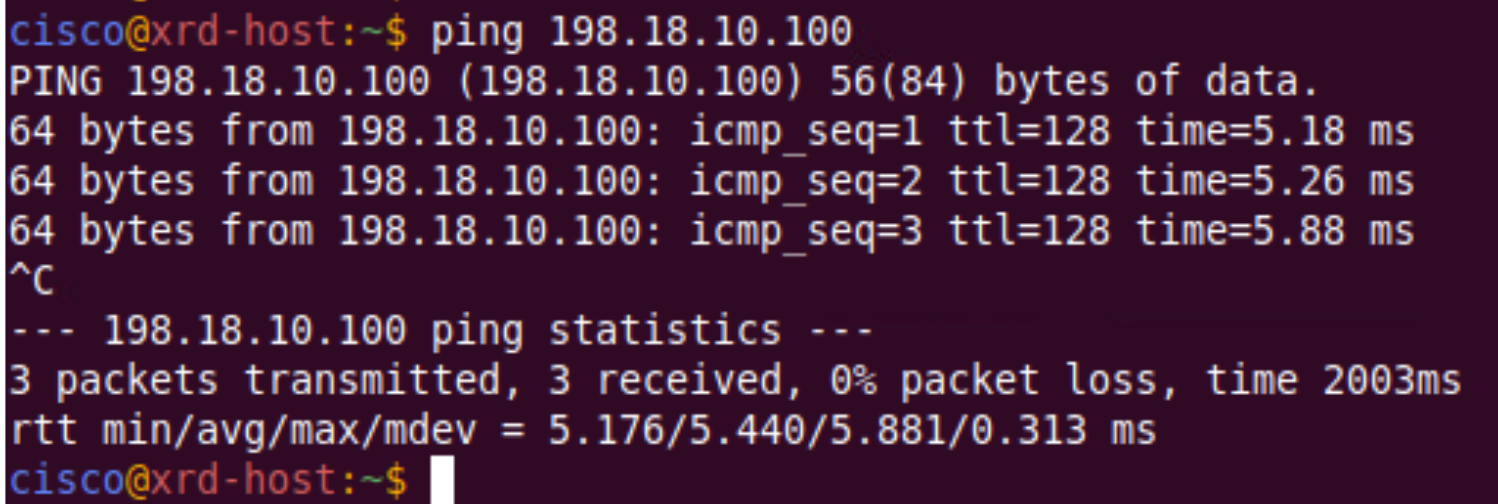
UbuntuからWindows(198.18.10.100)へのPing確認
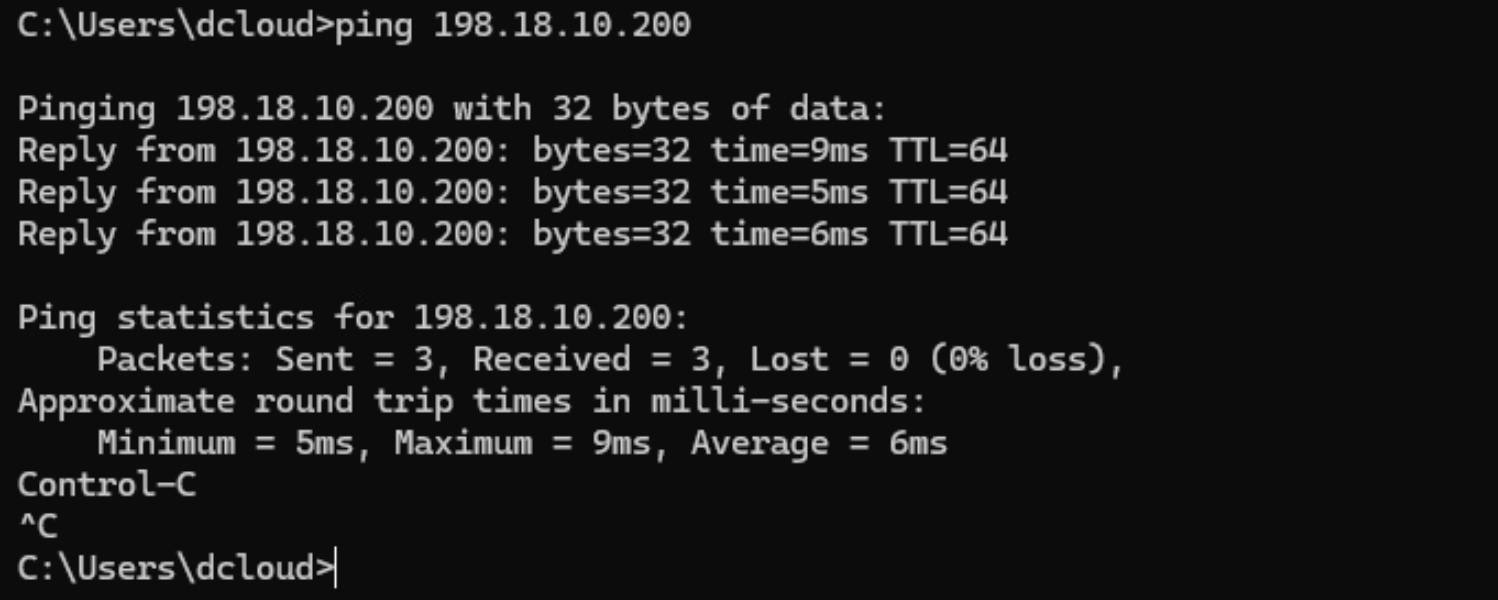
WindowsからUbuntu(198.18.10.200)へのPing確認
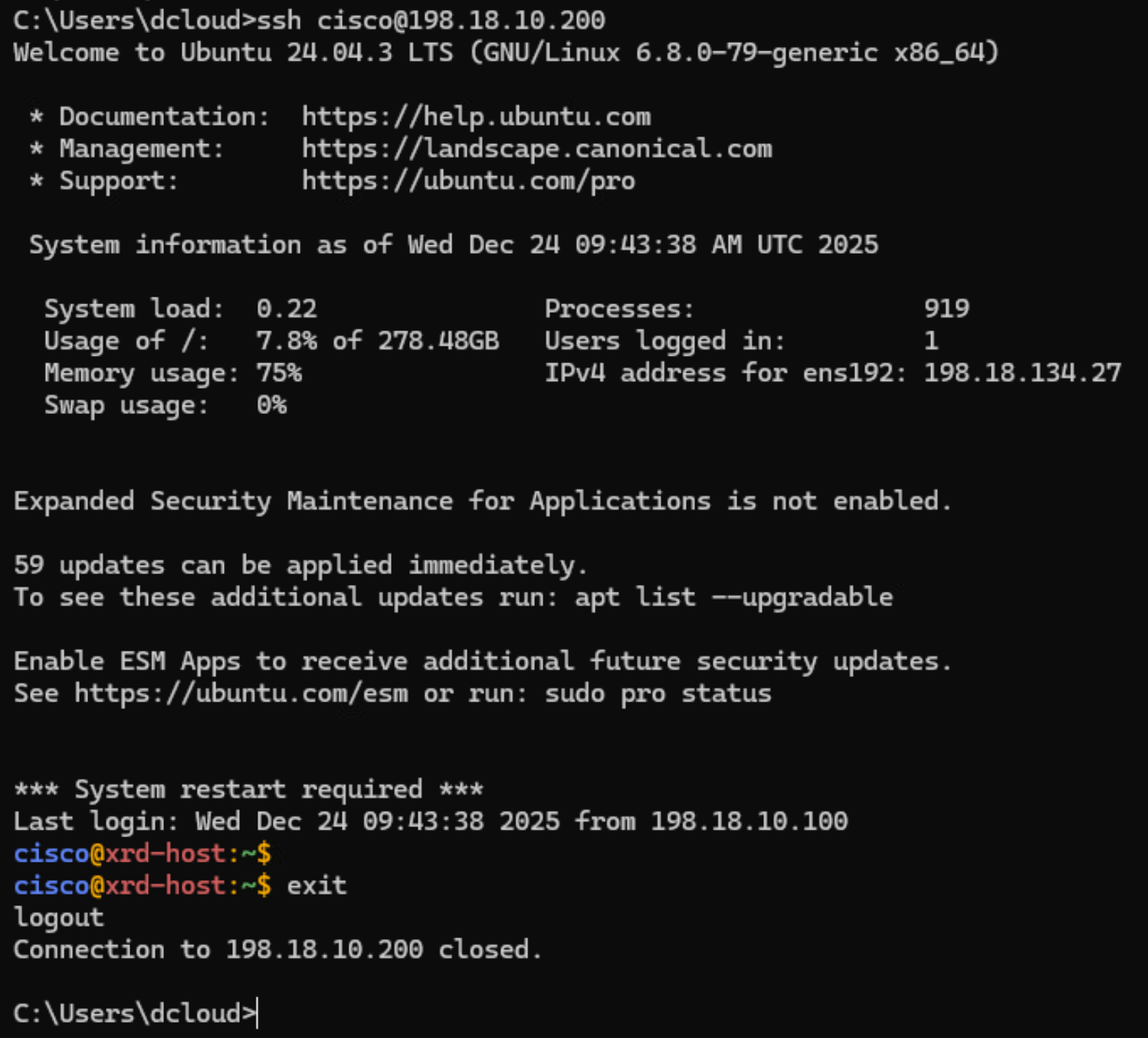
WindowsからUbuntu(198.18.10.200)へのSSH
5.6 パケットキャプチャ
ゴール
EVPN VPWSのラベル転送の動作を確認すること
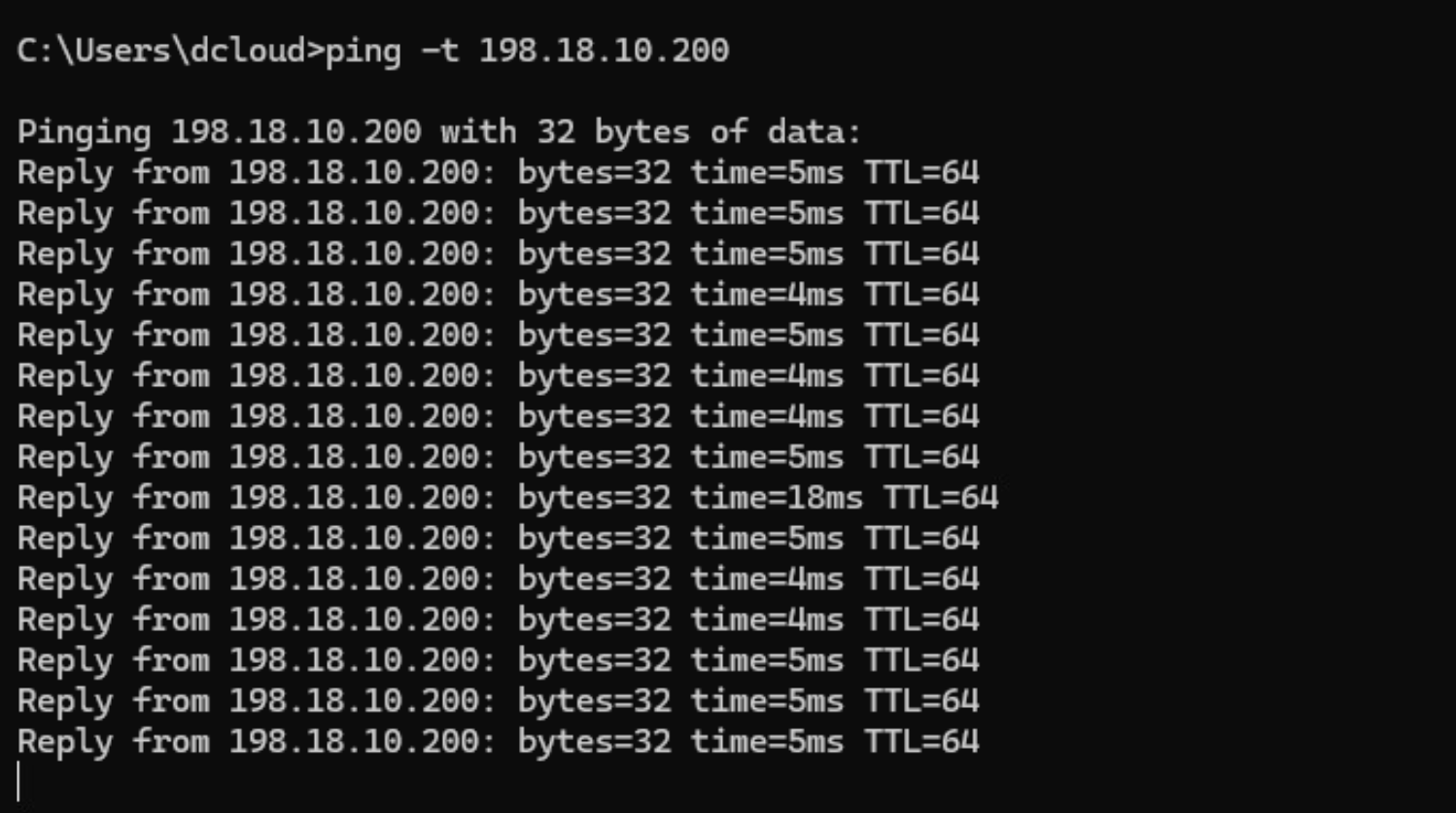
WindowsからUbuntu(198.18.10.200)へ継続的にPingを実施
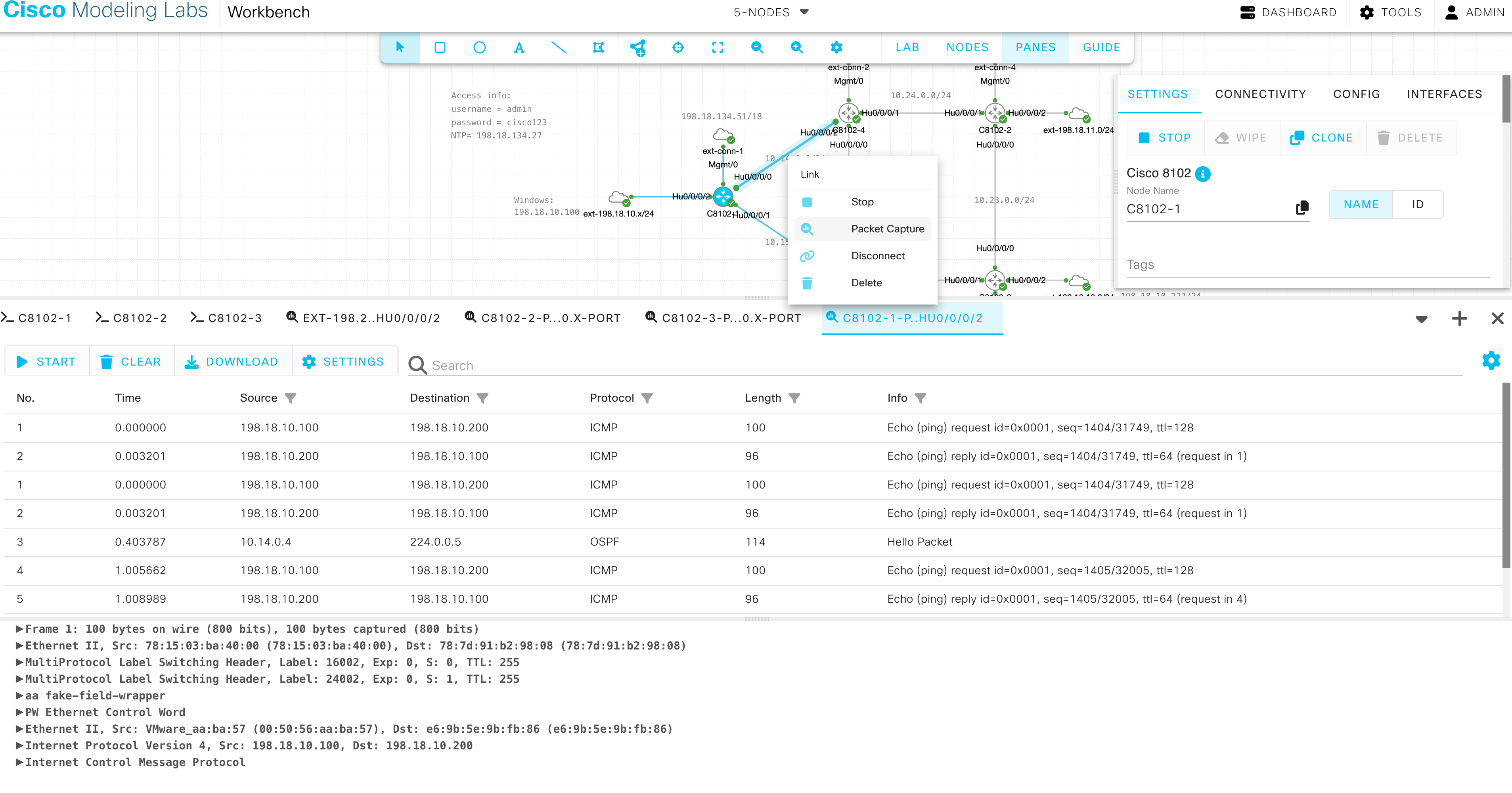
CML にて、C8102-1とC8102-4の間のリンクを右クリックし、Packet Captureを選択します。Start をクリックするとパケットキャプチャを開始します。Stop で停止します。
Source: 198.18.10.100, Destination: 198.18.10.200, Protocol: ICMP のパケットをクリックすると、詳細が表示されます。C8201-1からC8201-4へLabel: 24002 と 16002 が付与された上で転送されていることがわかります。
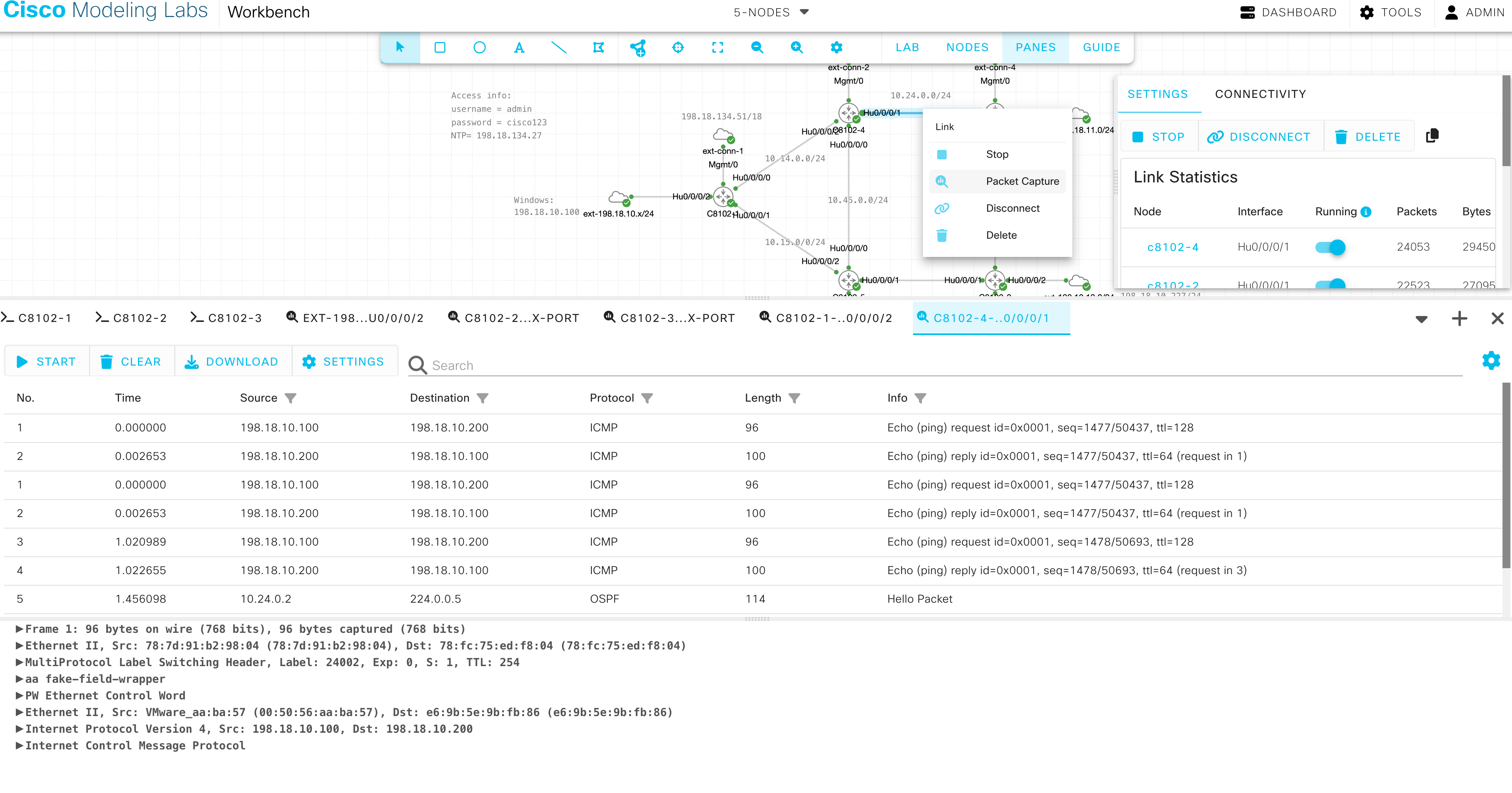
次に、C8201-4からC8201-2間のリンクを右クリックし、Packet Captureを選択します。Start でパケットキャプチャを開始し、Source: 198.18.10.100, Destination: 198.18.10.200, Protocol: ICMP のパケットをクリックします。PHPがデフォルトで有効になっているため、宛先の一つ手前でTransport Label (16002) が外されて、C8201-4からC8201-2へ転送されていることがわかります。
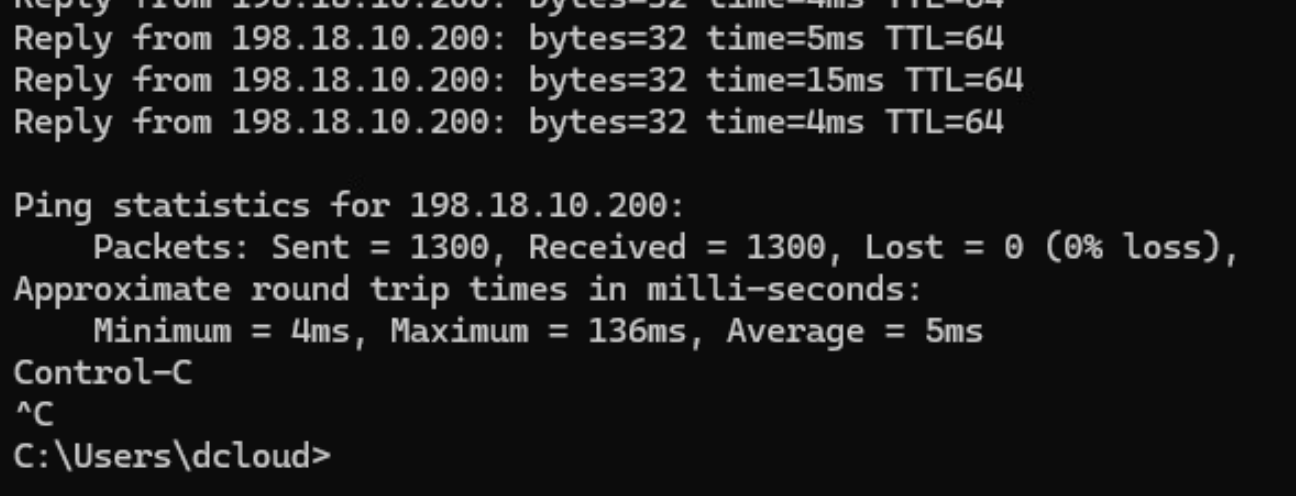
Ctrl+CでPingを止めます。
5.7 VPWS 設定の削除
ゴール
VPWS設定を削除すること
全てのPEにてCE向けインタフェース、EVPN設定を削除します(C8102-1 ~ C8102-3)
no interface HundredGigE0/0/0/2
no interface Bundle-Ether1
no evpn
no l2vpn
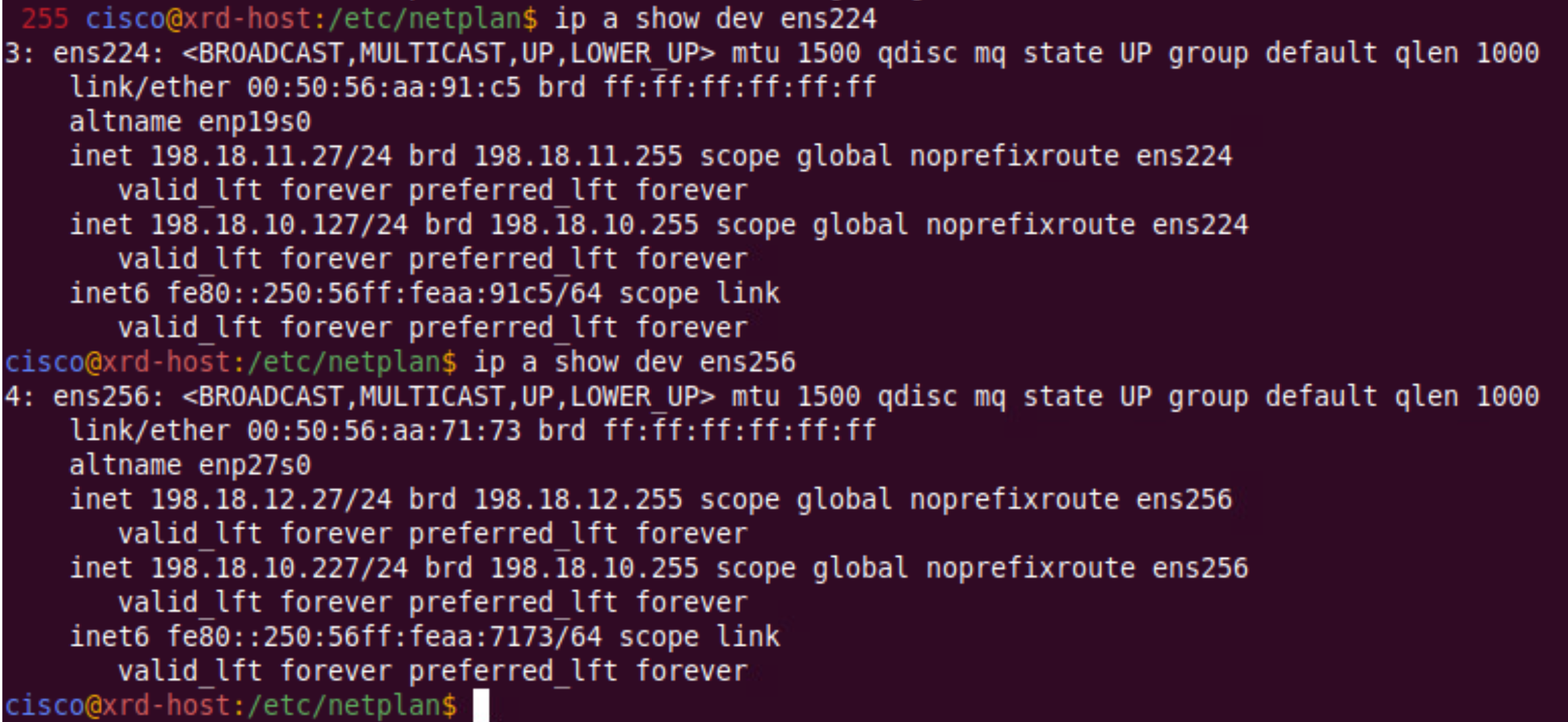
UbuntuにてLACP設定を削除します。UbuntuにてTerminalを開き、/etc/netplanにディレクトリを移動します。そして、01-netcfg.yaml を削除し、”sudo netplan apply” で適用します。(Password: 講師よりお伝えします)

”ip a show” コマンドにて、下記のようにens224とens256が表示されることを確認してください。
EVPN-VPWSのシナリオは以上です。